Product Photo Upscaling: How to Turn Low-Res Supplier Images into 4K Assets
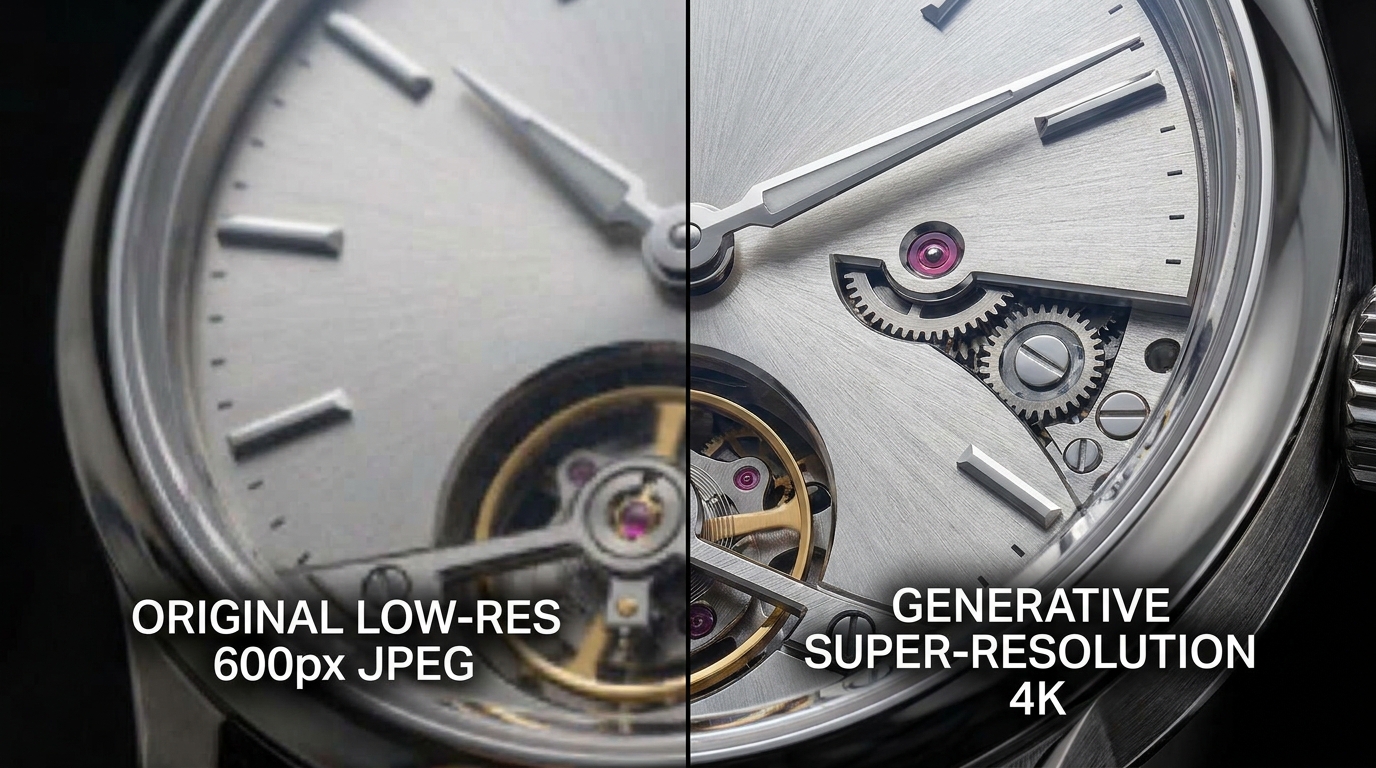
The High-DPI Reality: Why Low-Res Images Destroy Buyer Trust
Modern shoppers browse on iPhone Super Retina OLED screens and 4K desktop monitors. When an online shopper navigates to your product detail page (PDP) and taps the zoom loupe, pixelated or smeared textures immediately trigger subconscious hesitation.
Shoppers rely on visual inspection to assess product build quality: Is the leather genuine full-grain? Are the seam stitches tight and double-reinforced? Is the metal clasp brushed or polished? If the image turns into a blurry block of pixels upon zooming, customers assume the product is a cheap knock-off and bounce.
Furthermore, marketplaces like Amazon and Walmart explicitly disable the interactive hover-zoom magnifying glass for any image uploaded at under 1000 pixels. To activate premium zoom, platforms require source resolutions between 1600x1600 and 2400x2400 pixels.
Technical Breakdown: Traditional Interpolation vs. AI Super-Resolution
Understanding how image scaling works explains why standard Photoshop scaling tools fail to restore low-quality supplier assets:
| Scaling Technique | How It Works | Edge Sharpness | Texture Detail | Commercial Suitability |
|---|---|---|---|---|
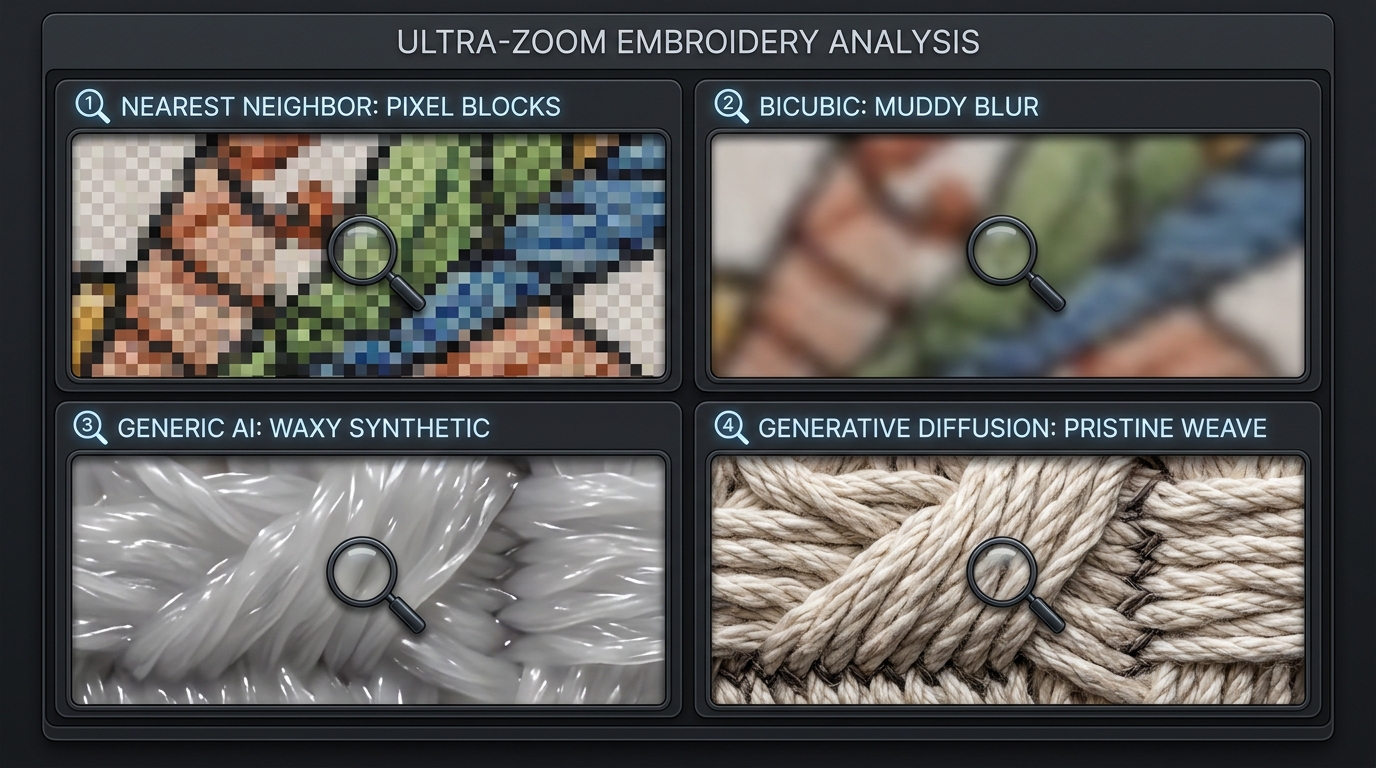
| Nearest Neighbor | Duplicates existing pixels | Jagged stair-stepping / pixelated blocks | Zero detail addition | Completely unusable for ecommerce |
| Bilinear / Bicubic Interpolation | Calculates average color between neighboring pixels | Soft, blurry, and smeared edges | Washes out fine fabric and leather grain | Outdated legacy standard |
| Generic Web AI Upscalers | Applies smoothing and sharpening filters | Often creates plastic 'waxy' appearance | Hallucinates random painterly patterns | High risk of brand distortion |
| Product-Aware Latent Diffusion (SocialShot) | Conditioned diffusion reconstructs realistic micro-textures | Razor-sharp contrast boundaries | True-to-life grain, stitch, and typography retention | Production-ready for 4K marketplace zoom |
The Mechanics of Generative Super-Resolution
Unlike classical mathematical interpolation—which merely averages existing pixel colors—modern generative AI super-resolution operates on learned structural priors. The neural network has analyzed millions of high-resolution product photographs across textiles, ceramics, leathers, metals, and woods.
When presented with a blurry 600px image of a cashmere sweater, the model does not guess random colors. It recognizes the distinctive loop patterns of cashmere knitting and generates high-frequency texture details that mathematically match physical textiles, scaling the asset to 2400px or 4096px while eliminating JPEG compression block artifacts.
- Artifact Suppression: Identifies 8x8 block discrete cosine transform (DCT) ringing artifacts common in web-compressed JPEGs and scrubs them out before upscaling.
- Micro-Edge Enhancement: Sharpens critical boundary lines (watch hands, buttons, zipper teeth, embroidery borders) without creating halo outlines.
- Text & Label Preservation: Maintains typographic legibility on nutrition facts panels, care labels, and brand emblems without turning characters into alien squiggles.
- Dynamic Range Recovery: Expands subtle shadow graduations that were crushed by low-bitrate compression.
4 Best Practices When Upscaling Low-Res Catalog Assets
Follow these operational guidelines to guarantee flawless scaling across your ecommerce catalog:
- Upscale Before Background Removal: Run super-resolution on your raw image first. Providing the segmentation model with higher pixel density results in vastly more accurate edge masks around hair, fur, and sheer fabrics.
- Lock Native Aspect Ratios: Always upscale proportionally (e.g., 2x or 4x). Forcing a 4:3 camera photo into a 1:1 square during upscaling stretches product geometry and distorts dimensions.
- Audit Fine Typography: Always perform a visual QA check on small brand badges and ingredient lists. If text is severely degraded in the source, use selective masking to preserve original branding.
- Optimize File Compression for Web: A 4K uncompressed PNG can exceed 15MB, severely hurting mobile page load speed. Export upscaled assets as progressive WebP or optimized JPEG (82–88% quality) to achieve sub-400KB file sizes.
What is AI product photo upscaling?
AI product photo upscaling is the process of using deep neural networks to enlarge low-resolution product images (e.g., from 600px to 2400px+) while intelligently reconstructing crisp edges, fine fabric textures, and removing JPEG compression artifacts.
Can upscaled photos pass Amazon and Walmart image quality standards?
Yes. High-grade AI upscaling using tools like SocialShot produces razor-sharp, artifact-free images that exceed the 1600px to 2000px resolution thresholds required to unlock marketplace hover-zoom capabilities.
Why not just use Photoshop Bicubic Smoother to enlarge photos?
Photoshop's Bicubic Smoother merely calculates mathematical averages between existing pixels, resulting in blurry, soft, and muddy images. It cannot generate missing texture, weave, or edge clarity.
Does AI upscaling hallucinate or alter logos and brand text?
Low-end generic upscalers can distort small text. However, specialized ecommerce platforms like SocialShot deploy product-conditioned models that preserve geometric fidelity and prevent synthetic text hallucination.
What is the maximum resolution I should upscale product images to?
For ecommerce web stores and marketplace listings, 2048 x 2048 to 2560 x 2560 pixels is the optimal sweet spot. It provides breathtaking zoom quality on mobile and desktop displays without excessive file weights.
Can I batch upscale an entire catalog of supplier images?
Yes. SocialShot allows bulk upscaling of hundreds of supplier photos concurrently via web batch upload or automated API, converting entire low-res product lines into 4K assets in minutes.
Upgrade Low-Res Supplier Photos into 4K Assets
Don't let blurry supplier images kill your conversion rates. Upscale and enhance your catalog images to crystal-clear 4K resolution with SocialShot.