Product Background Removal: How AI Delivers Crisp Cutouts in Under 5 Seconds
The Evolution of Background Removal: From Pen Tool to Neural Alpha Matting
Every commercial product catalog requires clean isolation. Whether you are exporting a transparent PNG for an interactive Shopify PDP, standardizing white backdrops for Amazon compliance, or staging items into contextual lifestyle sets, the quality of your initial cutout determines whether the end image looks like a high-end luxury advertisement or a crude copy-paste hack.
Traditionally, retouchers relied on vector clipping paths. While vector paths provide crisp boundaries on hard, geometric products (like metallic watches or smartphone cases), they fail catastrophically on organic textures. A vector path creates an unnatural, razor-sharp hard edge that strips away the natural translucency of fur trims, sheer silk chiffon, and liquid refraction.
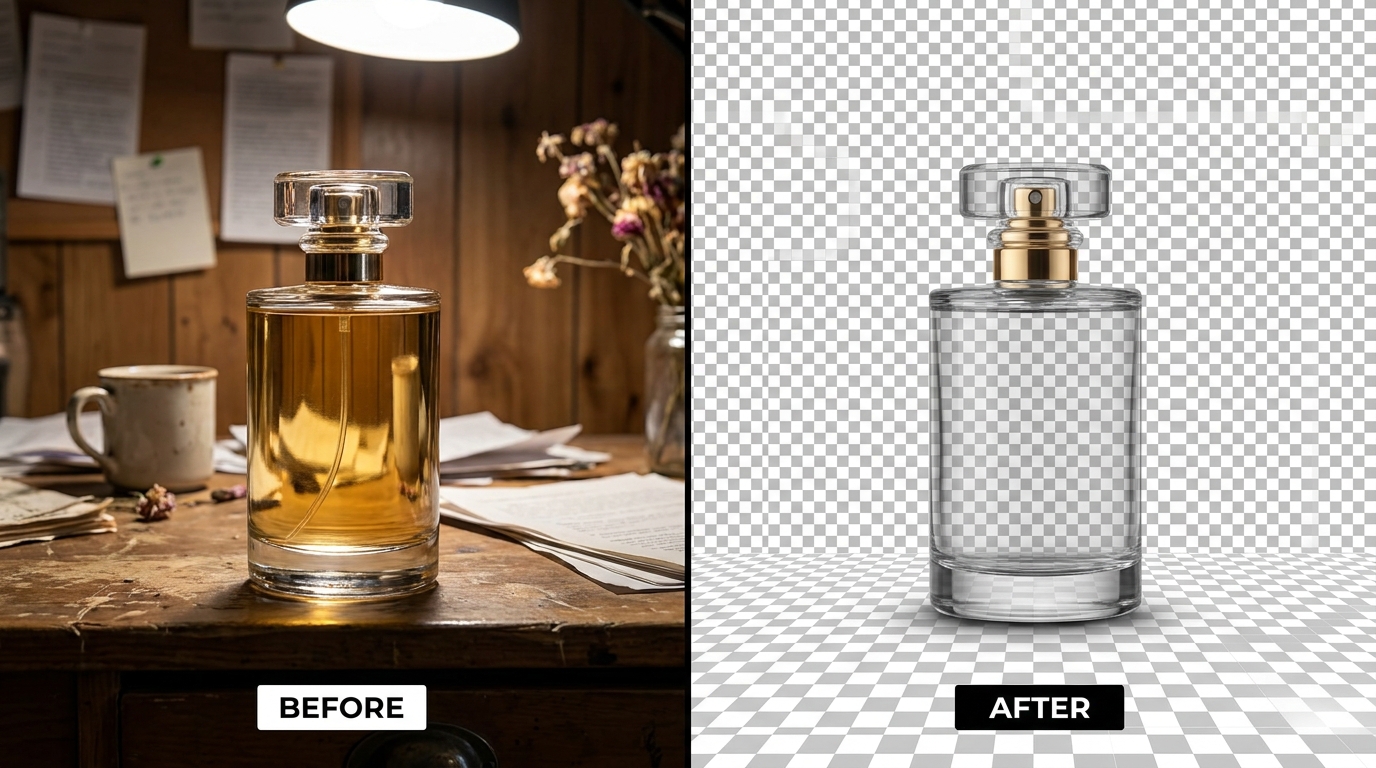
Modern generative platforms like SocialShot's AI Photoshoot Studio deploy neural alpha matting. Rather than forcing a binary yes/no mask on each pixel, the model calculates continuous opacity values between 0.0 (fully background) and 1.0 (fully foreground). This sub-pixel gradient preserves the soft micro-fibers along garment edges, translucent fragrance bottles, and natural specular reflections.
Technical Comparison: Manual Clipping vs. Color Thresholding vs. AI Matting
To understand why modern retail operations have phased out offshore manual retouching pools, examine the structural differences in speed, cost, and edge fidelity across production methodologies:
| Metric | Manual Photoshop Pen Tool | Legacy Thresholding (Magic Wand) | SocialShot Neural Alpha Matting |
|---|---|---|---|
| Average Processing Time | 8 – 15 minutes per image | 30 seconds (high manual cleanup) | Under 4 seconds automated |
| Unit Cost per SKU | $1.50 – $4.50 (offshore pool) | Internal labor overhead | $0.05 – $0.15 per asset |
| Edge Precision | Hard vector cut (stiff outlines) | Jagged pixel artifacts / fringing | Sub-pixel continuous alpha gradient |
| Glass & Transparency | Manual opacity layer cloning required | Completely deletes glass/liquid | Preserves internal liquid & specular sheen |
| High-Volume Scalability | Linear headcount bottlenecks | Inconsistent across team members | 5,000+ SKUs batch concurrent API |
Solving the 4 Toughest Product Isolation Challenges
Cheap or outdated background removal scripts consistently ruin product images across four distinct physical properties. Professional AI pipelines solve these through specialized conditioning layers:
- Translucent Glass and Liquids: Perfume bottles, wine glasses, and serum droppers require the background scene behind the glass to be removed while retaining the glass reflection and liquid tint. Neural matting preserves the Fresnel specular highlight as a semi-transparent layer.
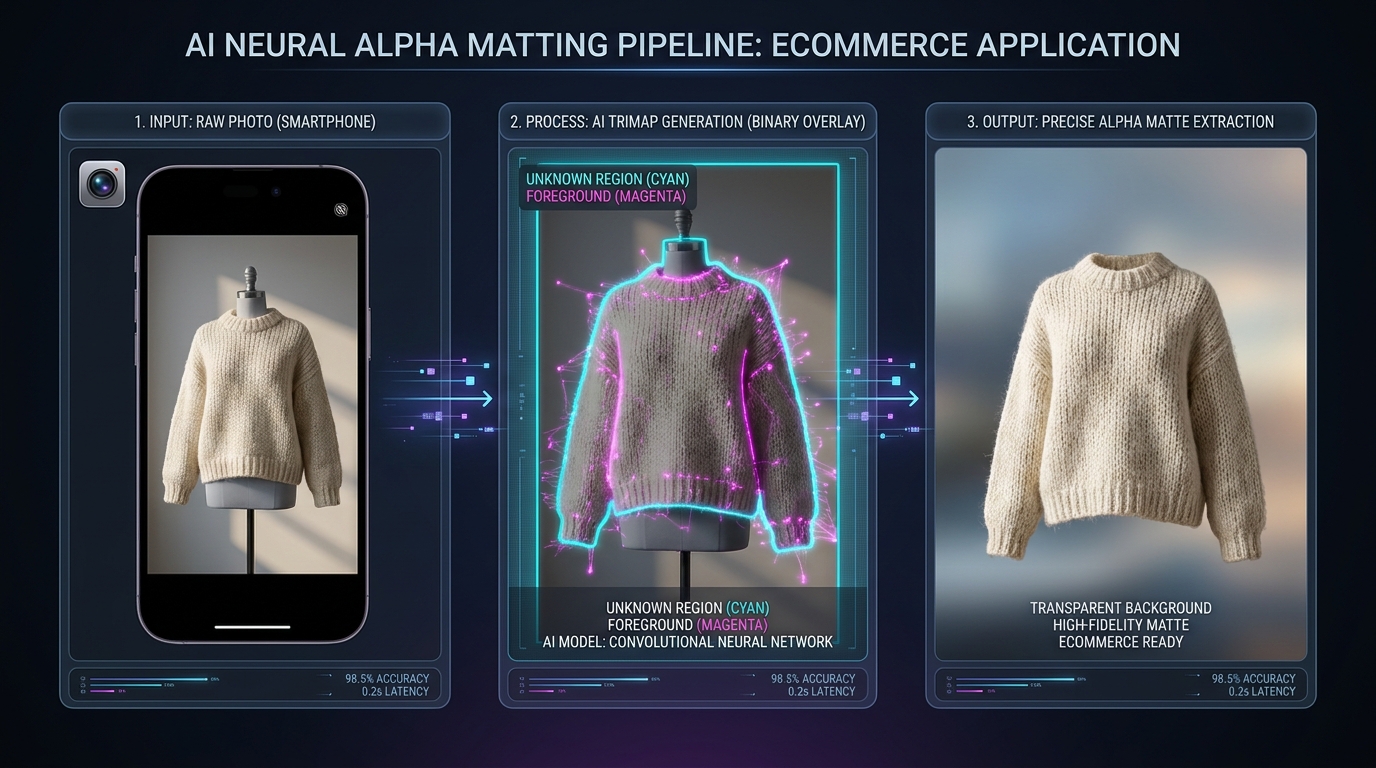
- Intricate Knits, Fur, and Hair: Chunky wool cardigans, faux-fur coat trims, and on-model flyaway hairs have non-contiguous boundaries. Semantic segmentation models identify fiber clusters individually, preventing the blocky 'helmet cut' effect common in basic tools.
- Reflective Chrome and Jewelry: High-polish silver and gold reflect whatever room they were photographed in. Advanced engines separate the object silhouette while de-contaminating environmental color spill on metallic chamfers.
- Ground Contact Shadows (Umbra Preservation): Completely cutting off the shadow makes a product appear to float weightlessly in void space. High-end pipelines isolate the natural contact shadow onto a secondary alpha layer, allowing you to ground the item realistically on any new surface.
5 Rules for Preparing Product Photos for Zero-Fringe Cutouts
While modern AI can salvage imperfect smartphone photos, feeding your pipeline clean source files will guarantee production-grade, print-ready results every time:
- Maximize Background Luminance Separation: Ensure your product color contrasts with the backing surface. Photographing a dark navy trench coat against a charcoal backdrop forces the model to guess edge coordinates; place it on light gray or white instead.
- Avoid Green Chromakey Spilling: While green screens work well for video, commercial product photography suffers when green light bounces off shiny packaging or white fabrics, creating an unwanted green halo that ruins color fidelity.
- Use Deep Depth of Field (f/8 – f/11): Shallow depth-of-field looks artistic, but blurry out-of-focus product edges make clean edge detection difficult. Keep the entire product perimeter in sharp focus, and simulate soft background bokeh later in software.
- Neutralize Chromatic Aberration: Low-cost camera lenses produce purple or cyan fringing around high-contrast edges. Enable lens profile correction in Lightroom or your camera firmware before batch exporting to your AI tool.
- Retain True Resolution: Never crop your source photos down to 800px before background removal. Feed the model the full 12MP to 24MP sensor capture; downsample only after isolation is complete.
What is the difference between clipping path and neural background removal?
A clipping path is a vector outline manually drawn with the Photoshop Pen tool that cuts an image with a razor-sharp, binary edge. Neural background removal uses deep learning to calculate continuous transparency across millions of pixels, perfectly handling fine hairs, sheer fabrics, and glass reflections.
Why do my product cutouts have ugly colored fringes around the edges?
Fringing occurs when pixels along the perimeter blend the product color with the original background lighting (known as color contamination). High-end AI background removers include an automatic de-fringing pass that strips background light bounce from edge pixels.
Can AI remove the background while keeping the natural contact shadow?
Yes. Advanced tools like SocialShot isolate both the object and its contact shadow (the dark umbra beneath the product), rendering the shadow as a semi-transparent layer so the item remains grounded on any new background.
What image format should I export after removing the background?
For transparent backgrounds, always export as 24-bit PNG or WebP with alpha channel enabled. If publishing directly to Amazon or Google Shopping, export as a non-transparent JPEG with a pure RGB 255, 255, 255 white background.
Can I remove backgrounds from 500+ product photos in bulk?
Yes. Using SocialShot's catalog batch processing, merchants can upload zip archives or CSV feeds containing hundreds of SKUs and receive fully isolated, defringed PNGs in parallel within minutes.
Will transparent product images slow down my Shopify store?
Uncompressed PNGs can be heavy (3MB to 8MB). To maintain sub-second page load times, compress your transparent PNGs using lossless tools or convert them to modern alpha-supported WebP format, reducing file sizes by up to 70%.
Isolate Product Photos with Sub-Pixel Precision
Say goodbye to costly manual clipping paths and jagged pixel fringes. Upload your product photos and generate studio-grade cutouts in seconds with SocialShot.