How AI Product Photography Works: The Tech Behind the Scenes
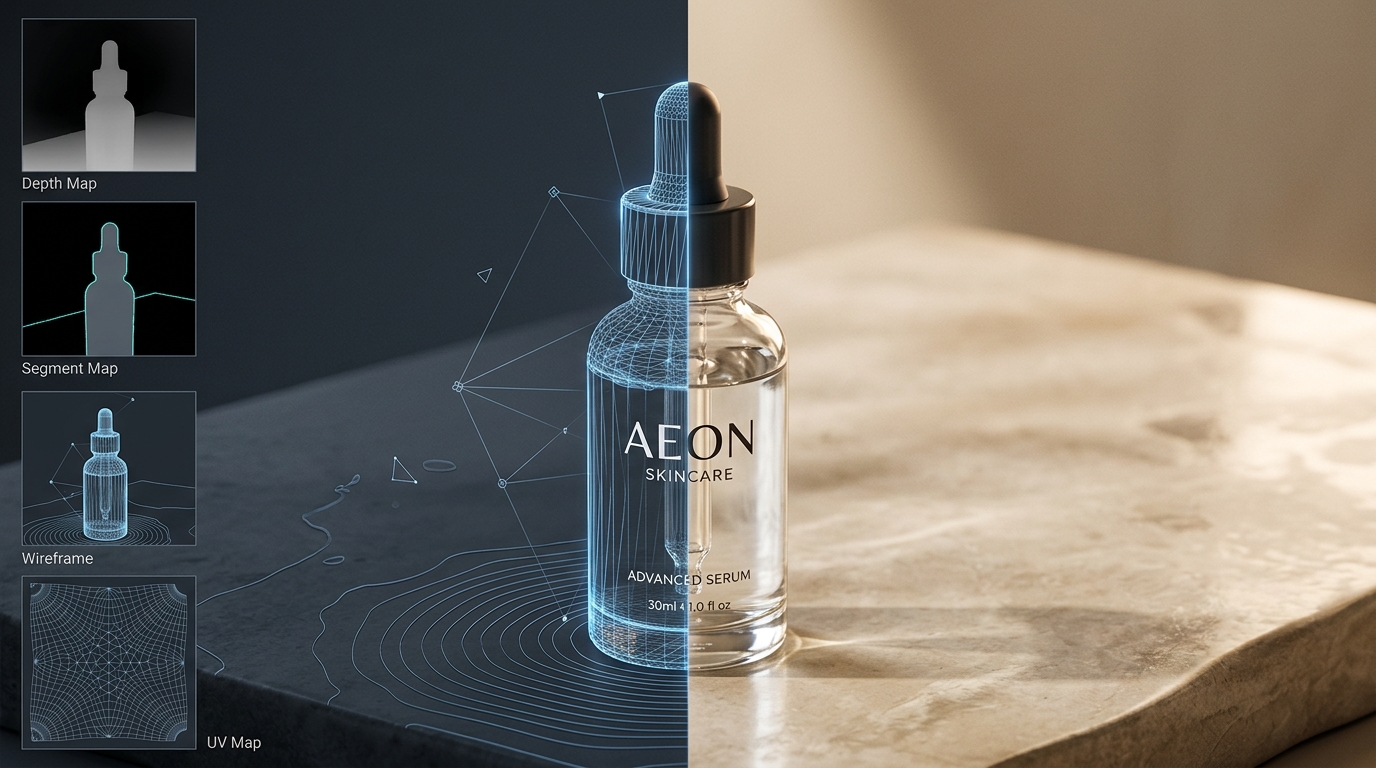
To anyone who has tried typing "photo of my skincare bottle on a marble slab in morning light" into a consumer image generator like Midjourney or DALL-E, the result was almost certainly unusable: the bottle looked beautiful, but the text on the label was gibberish, the cap was reshaped, and the brand logo had morphed into an unrecognizable smudge.
Commercial ecommerce demands the exact opposite: absolute product fidelity. The typography, seam lines, proportion, and colorway of the physical product must match the customer's purchase with mathematical precision, while only the background, lighting, and environmental context change.
This article demystifies the engineering architecture behind modern AI product photography, explaining the four-stage pipeline that preserves physical items, how software solves the physics of light and shadows, and how to evaluate whether a generation pipeline meets commercial standards.
Why Generic AI Generators Fail at Physical Products
To understand how specialized product photography systems work, it helps to understand why standard generative models fail at commercial catalog tasks:
- Text-to-image models operate in unconstrained latent space. When you prompt a standard text-to-image model, it samples Gaussian noise and iteratively denoises pixels toward a statistical average of its training concepts. It has no physical anchor to your specific manufactured SKU.
- Hallucinated micro-details. Generic models invent details where they predict contrast should exist. On a face or fantasy landscape, this creates stunning texture; on a branded garment or packaged cosmetic, it destroys barcode readability, fabric weave, and trademarked logos.
- Geometric drift across angles. Because standard models cannot hold a 3D structural coordinate map of an input object, asking for a "side view" or "top view" generates completely different product dimensions, seams, and closures.
Solving this problem requires moving from unconstrained text-to-image synthesis to conditioned image-to-image compositing, where the physical product serves as a hard boundary condition that the generative model is forbidden from altering.
The 4-Stage Product-Preserving Diffusion Pipeline
Behind an intuitive one-click interface, a specialized product imaging platform executes a four-stage computational pipeline designed to balance pixel-level preservation with realistic environmental synthesis:
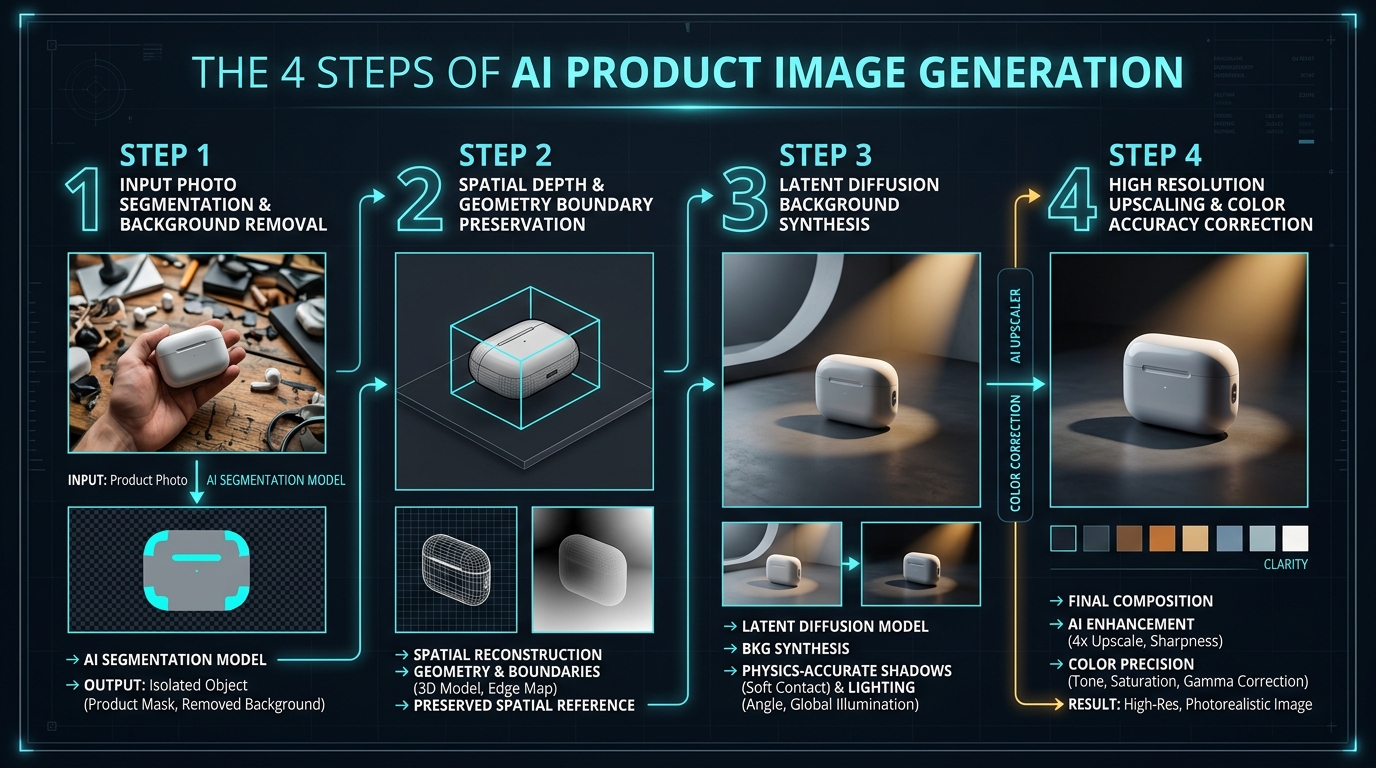
Stage 1: Sub-Pixel Edge Segmentation and Alpha Matting
The process begins by identifying where the physical product ends and the original background begins. Simple thresholding or color keying fails on real-world photos containing complex textures like woven wool, semi-transparent liquid containers, or flyaway hair.
Modern systems employ deep convolutional neural networks (such as modified BiRefNet or segment-anything architectures) trained on millions of object boundaries. These models produce a high-resolution alpha matte with soft fractional values (0 to 255) along the perimeter, cleanly isolating semi-translucent glass edges, fine bristles, and fabric fuzz without the harsh, jagged clipping paths produced by primitive cutoff tools.
Stage 2: Spatial Geometry and Depth Conditioning
Once isolated, the product's physical geometry is locked into place. Rather than feeding raw pixels directly into a diffusion model, the system extracts structural conditioning maps—typically depth estimations (MiDaS or ZoeDepth) and surface normal vectors (ControlNet or T2I-Adapters).
This step creates a virtual 3D mesh representation of the product within the scene coordinates. It informs the AI where the bottom of the bottle makes contact with a surface, how tall the product stands in perspective, and where surrounding light rays should occlude or reflect. The original RGB pixels of the product are preserved in a protected mask layer, guaranteeing that text, labels, and logos remain untouched.
Stage 3: Latent Diffusion and Physical Lighting Synthesis
With the product anchored in 3D scene space, the latent diffusion model generates the environment. Unlike simple Photoshop copy-and-paste layering, the generative model synthesizes the background around the product boundaries simultaneously.
The model calculates the desired environmental lighting (for instance, directional morning sunlight at 45 degrees) and applies reciprocal physical effects to the product's contact zone:
- Contact shadows: A dark, sharp shadow directly beneath the physical touchpoint where light cannot penetrate.
- Diffuse cast shadows: A soft-edged penumbra that stretches away from the product in alignment with the light source angle.
- Ambient occlusion: Subtle darkening in deep crevices, under bottle lips, and between folds of fabric where indirect ambient light is blocked.
- Fresnel & caustic reflections: On smooth surfaces like polished marble, water, or lacquered wood, the system renders a mirror reflection or distorted light caustics calculated from the product's base geometry.
Stage 4: Super-Resolution and True-Color Restoration
Generative models natively operate in compressed latent dimensions (often 512x512 or 768x768 latent patches). To produce 2K or 4K commercial assets suitable for marketplace zoom inspection, the output undergoes specialized neural upscaling (such as Real-ESRGAN or latent tile upscalers).
Crucially, a color-fidelity restoration pass analyzes the original source photo's histogram and reapplies exact hex-value color grading to the product mask. This prevents the generative lighting from shifting a brand's signature pantone color (for example, turning navy blue into slate or warm red into magenta).
Comparing Text-to-Image AI vs. Product-Preserving Systems
Understanding the distinction between open-ended creative generators and specialized product pipelines is critical when choosing tools for an ecommerce workflow:
| Technical Dimension | Generic Text-to-Image (Midjourney, DALL-E) | Product-Preserving Diffusion (SocialShot) |
|---|---|---|
| Primary Input | Text description only | Real product reference photo + scene prompt/preset |
| Subject Geometry | Hallucinated from statistical training data | Locked via spatial conditioning & boundary masks |
| Typography & Branding | Distorted, misspelled, or illegible | 100% pixel-accurate to original packaging |
| Contact Shadows | Approximated or frequently missing | Ray-calculated ambient occlusion & directional penumbra |
| Multi-Angle Consistency | Impossible (every generation creates a new item) | Maintainable across front, angle, and detail shots |
| Production Readiness | Concept art & moodboards only | Marketplace-ready listing images & ad creatives |
The Physics of Shadows: Why Most AI Photos Look Fake
When human eyes look at an image and instinctively think "something looks fake here," the culprit is almost never the background itself—it is almost always the contact shadow.
In the physical world, when an object rests on a table, the area directly beneath the base creates a region of zero direct illumination called the umbra. Because light bounces off surrounding walls and ceilings, the shadow gradually softens into a penumbra as it extends outward.
Primitive background removal tools replace the background but leave the object floating without contact shadows, creating a jarring "sticker slapped onto paper" effect. High-end product photography engines solve this by analyzing surface normal angles and rendering three distinct shadow layers simultaneously: a sharp contact occlusion shadow, a directional cast shadow matching the primary key light, and subtle ambient bounce light on the shaded side of the product.
Handling Complex Surfaces: Glass, Metallics, and Sheer Fabric
Different physical materials present distinct challenges to generative diffusion pipelines:
- Transparent and amber glass: Clear liquid bottles require the AI to generate the new background through the glass body while applying optical refraction and distortion consistent with the glass curvature. Alpha matting models preserve the glass highlights while allowing background ambient tones to pass through the liquid.
- Highly reflective chrome and gold: Metallic surfaces reflect their surroundings. If an amber dropper bottle has a gold cap, the generative engine must render subtle environmental reflections (such as the warm marble surface below) onto the metal without obscuring the product's finish.
- Textured apparel and knitwear: On-model fashion generation requires neural warping models that calculate how flat fabric drapes across three-dimensional human anatomy, preserving weave texture, pocket placement, and seam tension (detailed further in our fashion product photography workflow).
How SocialShot Implements Product-Preserving Generation
SocialShot's proprietary generation pipeline was engineered specifically around these commercial constraints. By coupling high-precision boundary segmentation with tuned spatial ControlNet conditioning, SocialShot ensures that your actual product remains unaltered while generating photorealistic studio cycloramas, natural stone surfaces, or live-model lifestyle scenes in under 30 seconds.
For merchants managing growing catalogs, bulk product photography applies identical lighting coordinates, camera angles, and shadow depths across dozens of SKUs simultaneously, ensuring complete visual harmony across your entire storefront collection.
Experience product-preserving AI generation
Test studio-grade scene generation, on-model styling, and marketplace compliance with SocialShot AI.
Frequently Asked Questions
Does AI product photography modify my product's logo or packaging labels?
No. In a product-preserving pipeline like SocialShot, the product's original pixels and boundary geometry are isolated in a protected mask layer. The AI generates the lighting, reflections, and environmental background around the product, leaving branding, typography, and logos completely authentic.
How does the AI know where to place contact shadows?
The system runs a spatial depth analysis on the input image to determine the exact contact plane where the base of the product meets the surface. It then calculates the vector of the simulated light source to cast physics-accurate contact shadows and ambient occlusion directly beneath the object.
Do I need to train a custom AI model (LoRA) for each of my products?
No. Unlike older generative workflows that required training a custom model on 20+ images of every single SKU, modern zero-shot conditioning models extract geometry and texture directly from a single high-resolution reference photograph in real time.
Can the AI match my existing brand lighting style?
Yes. By selecting specific scene presets or directing the environmental prompt (such as 'soft diffused north window light' or 'dramatic high-contrast spotlight on black slate'), the diffusion model aligns the key light, rim highlights, and shadow softness to match your brand aesthetic.
Why do some AI product photos look blurry when zoomed in?
Blurriness occurs when a tool relies on low-resolution latent outputs without a secondary neural upscaling and sharpening pass. Commercial platforms use specialized super-resolution algorithms that enhance edge sharpness and restore fine texture, ensuring images hold up under marketplace zoom inspection.
Can AI product photography handle products shot on a phone?
Yes. High-end smartphone cameras provide excellent resolution and color depth. As long as your phone photo is in focus, well lit by natural daylight, and taken without extreme wide-angle distortion, the AI can isolate the product cleanly and render a studio-grade environment around it.