Ghost Mannequin to Model Photography: How AI Turns Flat Apparel into Editorial Looks
The Merchandising Dilemma: Ghost Mannequin vs. On-Model
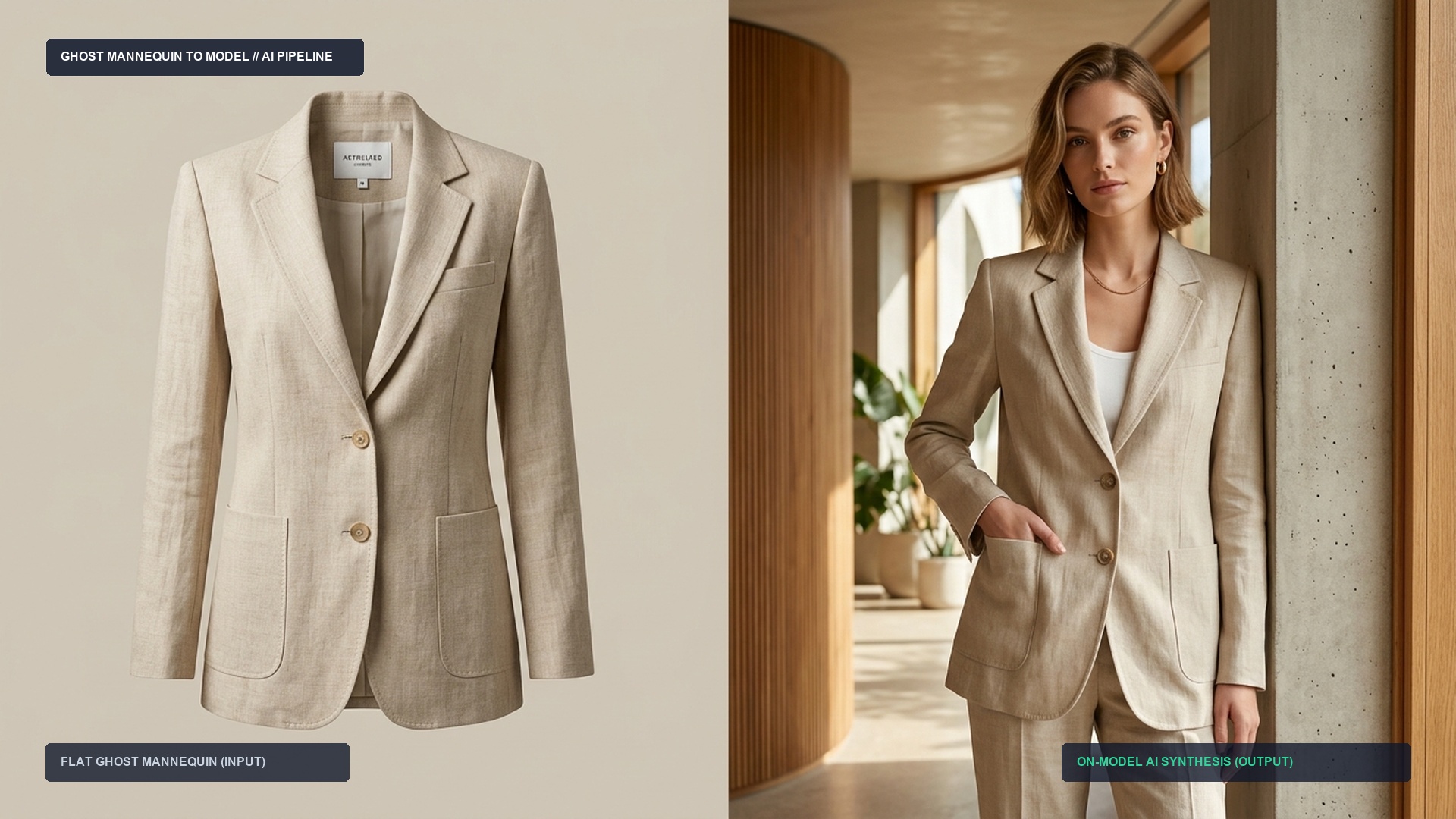
For the past two decades, invisible ghost mannequin photography has served as the backbone of ecommerce apparel merchandising. By photographing garments on modular plastic forms and digitally removing the neck joint in post-production, apparel retailers achieved clean, symmetrical product silhouettes without the ongoing expense of booking casting models, hair and makeup artists, and physical studio stages.
However, conversion data across modern fashion D2C stores reveals a stark limitation. While ghost mannequin cutouts clearly show collar labels and garment shapes, they fail to answer the shopper's most critical subconscious question: 'How does this actually drape, stretch, and fit on a human body?' According to benchmark studies by the Baymard Institute, apparel product pages that only display flat or ghost mannequin imagery suffer higher cart abandonment and up to 34% higher return rates compared to pages displaying on-model photography.
| Merchandising Method | Cost per SKU | Turnaround Time | Buyer Context & Fit Clarity | Annual Catalog Scalability |
|---|---|---|---|---|
| Invisible Ghost Mannequin | $15 – $35 / garment | 3 – 5 days (clipping paths) | Low: Static hollow shape, no human proportion or motion | Moderate: Requires physical studio handling & clipping |
| Traditional Live Model Shoot | $120 – $350 / look | 2 – 4 weeks (casting & editing) | High: Shows movement, styling, and authentic drape | Low: Constrained by model availability and studio call sheets |
| SocialShot AI On-Model Synthesis | $2.99 / final render | < 60 seconds / SKU | High: Anatomical drape, diverse demographics, realistic tension | Near Infinite: Batch transforms entire collections overnight |
The Technical Challenge: Solving the 'Hollow Cavity' Problem
Early generative AI tools struggled severely with ghost mannequin inputs. Because the garment cutout features a hollow gap where the mannequin neck and chest were digitally erased, naive text-to-image models either hallucinated strange flesh tones floating inside the collar or generated necklines that looked like skin glued directly to the fabric lining.
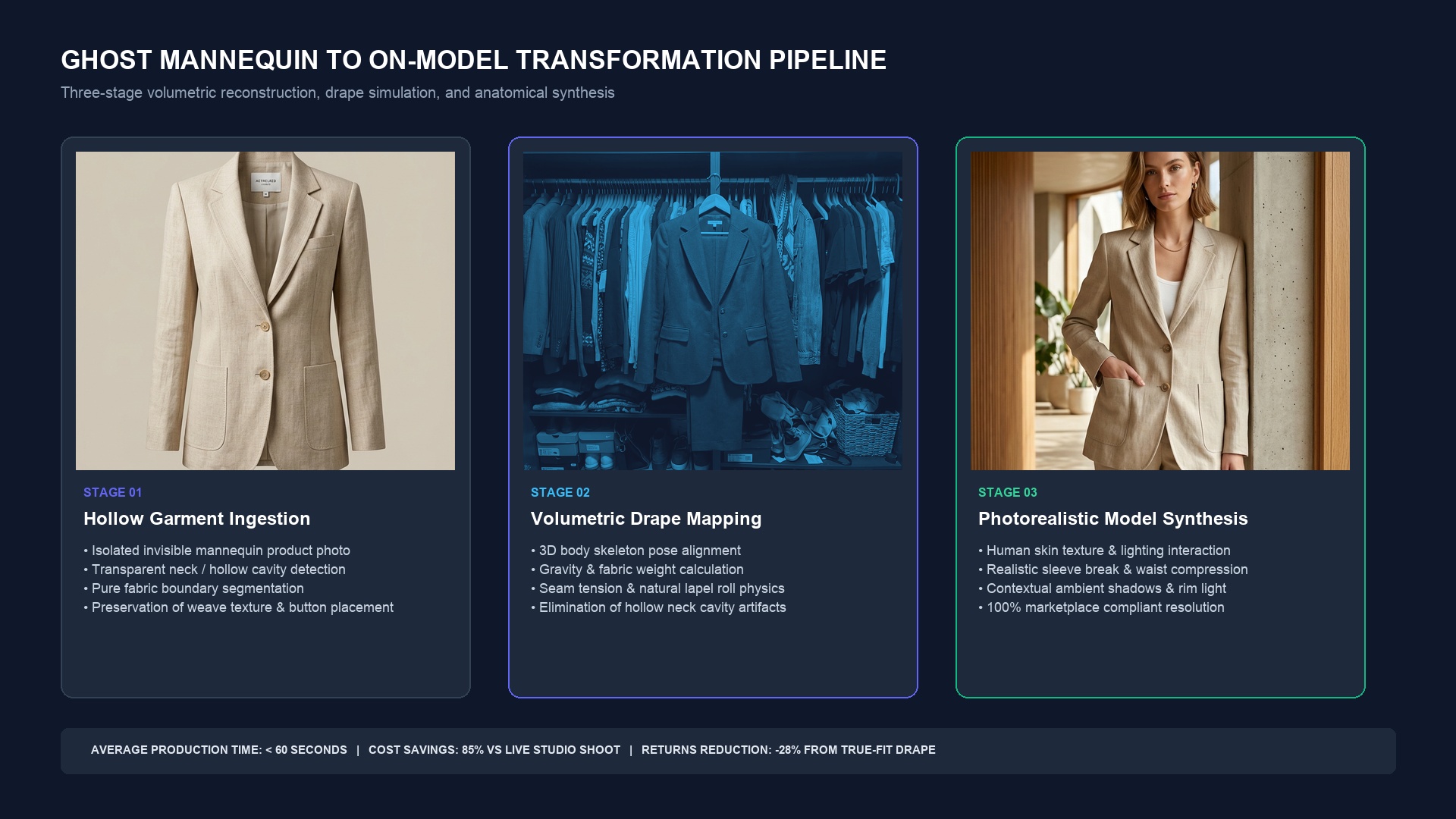
Achieving commercial-grade fidelity requires a structured, multi-stage pipeline that treats the hollow garment as a three-dimensional volumetric shell rather than a flat 2D mask. SocialShot's pipeline executes three precise operations:
- Inner-Lining Inpainting: The pipeline detects the open collar boundary and synthesizes the anatomically correct interior neck wall, shoulder curve, and inner garment lining before projecting the human model.
- Volumetric Drape Mapping: Rather than pasting a face above the collar, a 3D anatomical wireframe is fitted beneath the garment. Fabric physics algorithms calculate weight, gravity, and seam tension to predict how the fabric naturally breaks over clavicles, chest, and arms.
- Ambient Lighting & Texture Transfer: The original weave, stitching, button reflections, and embroidery are isolated on an uncompressed luminance channel, ensuring that zero fabric fidelity is lost during the model generation.
Step-by-Step Workflow: Turning Flat Inventory into High-End Lookbooks
Whether you have a 500-SKU back catalog of ghost mannequin photos from previous seasons or are shooting fresh inventory in-house, turning those assets into dynamic editorial campaigns requires four disciplined steps:
- 1. Capture or Export Clean Cutouts: Ensure your ghost mannequin source files are photographed against a neutral grey or white background with uniform studio lighting. Crisp edge contrast around hems and cuffs makes automated alpha segmentation instantaneous.
- 2. Select Model Demographics and Studio Ambience: In the Product Photoshoot tool, choose your target model demographic, hair styling, skin tone, and background mood (such as a sunlit Paris apartment, modern concrete architectural studio, or minimalist warm cyclorama).
- 3. Fine-Tune Pose and Garment Fit: For structured garments like tailored blazers or coats, select a relaxed standing posture with hands resting naturally to demonstrate pocket placement and sleeve break. For flowing garments like slip dresses or skirts, select gentle motion poses that reveal fabric drape.
- 4. Execute Quality Assurance (QA): Inspect critical contact points: collar neckline transition, cuff openings, hemline level, and pattern alignment. If any seam distortion occurs, regenerate with tightened mask parameters.
Common Pitfalls in Ghost-Mannequin AI Conversions (And How to Prevent Them)
While the speed of AI is intoxicating, careless prompt engineering or poor source files lead to common merchandising flaws that erode customer confidence:
- Neckline Bleed & Inconsistent Skin Tones: When source cutouts have fuzzy clipping masks, the AI often blends the model's neck skin directly into the garment collar. Always verify that inner collar labels and clean collar edges remain crisp.
- Fabric Flattening: Cheap AI filters often over-smooth cotton, denim, or linen textures, turning tactile fabrics into plastic-looking CGI. SocialShot prevents this by enforcing high-frequency luminance retention on every garment layer.
- Artificial Hand Placements: Poses that require hands inside pockets or resting on hips can sometimes generate unnatural finger geometries in raw models. Use proven pose templates from the SocialShot catalog that are pre-rigged for anatomical perfection.
Multi-Angle Catalog Consistency: Front, 45-Degree, and Back Shots
A single front view is rarely enough to close a purchase on premium apparel. To build consumer confidence, standard fashion listings require a front hero, a 45-degree three-quarter profile, a back detail view, and a close-up macro texture shot.
When photographing ghost mannequins for AI conversion, photograph both the front and rear views of the garment on the dummy. By uploading both angles to SocialShot's Bulk Fashion Studio, our engine locks the virtual model's hairstyle, height, and body dimensions across all angles, delivering a synchronized 360-degree product gallery that matches top-tier luxury fashion houses.
Can I use flat-lay photography instead of ghost mannequin photos?
Yes. While ghost mannequins provide built-in 3D shape, SocialShot's volumetric engine can also extrapolate human anatomy from flat-lay photos shot on a flat table or floor, calculating where natural folds and armholes should expand on a 3D body.
Does the AI change the exact color, pattern, or stitching of my garment?
No. SocialShot utilizes strict garment segmentation masks that isolate the exact textile pixels. The AI generates the human model, posture, lighting, and environment around and beneath the garment while leaving patterns, logos, and stitching 100% faithful to reality.
What image resolution is required for ghost mannequin source photos?
We recommend source images of at least 2000 x 2000 pixels at 72 DPI or higher. Clear resolution ensures buttons, collar seams, and fabric weaves are preserved with complete tactile clarity.
Can I choose different model body types (e.g. petite, athletic, plus-size)?
Absolutely. You can specify precise body shapes and sizes. The AI automatically grades and scales the garment drape to reflect authentic anatomical proportions, preventing inaccurate fit depictions.
How does this compare in cost to hiring a freelance retoucher for neck joints?
Traditional ghost mannequin retouching (combining front and back neck shots in Photoshop) typically costs $1.50 to $4.00 per image just for the hollow cutout. SocialShot transforms that cutout into a full editorial on-model photoshoot starting at just $2.99 per render.
Are the generated on-model photos compliant with Amazon, Shopify, and Myntra?
Yes. All outputs can be configured for pure white studio cycloramas (RGB 255, 255, 255) for strict Amazon marketplace standards, or high-end lifestyle interiors for Shopify and Instagram storefronts.
Turn Your Flat Garments into Editorial On-Model Campaigns
Upload your ghost mannequin or flat-lay photos to SocialShot and generate stunning, photorealistic on-model imagery in under 60 seconds.
Last updated September 2026. Merchandising conversion benchmarks referenced from Baymard Institute and Shopify Commerce Performance Reports.