Social Content at Scale: One Month of Posts From a Single Upload
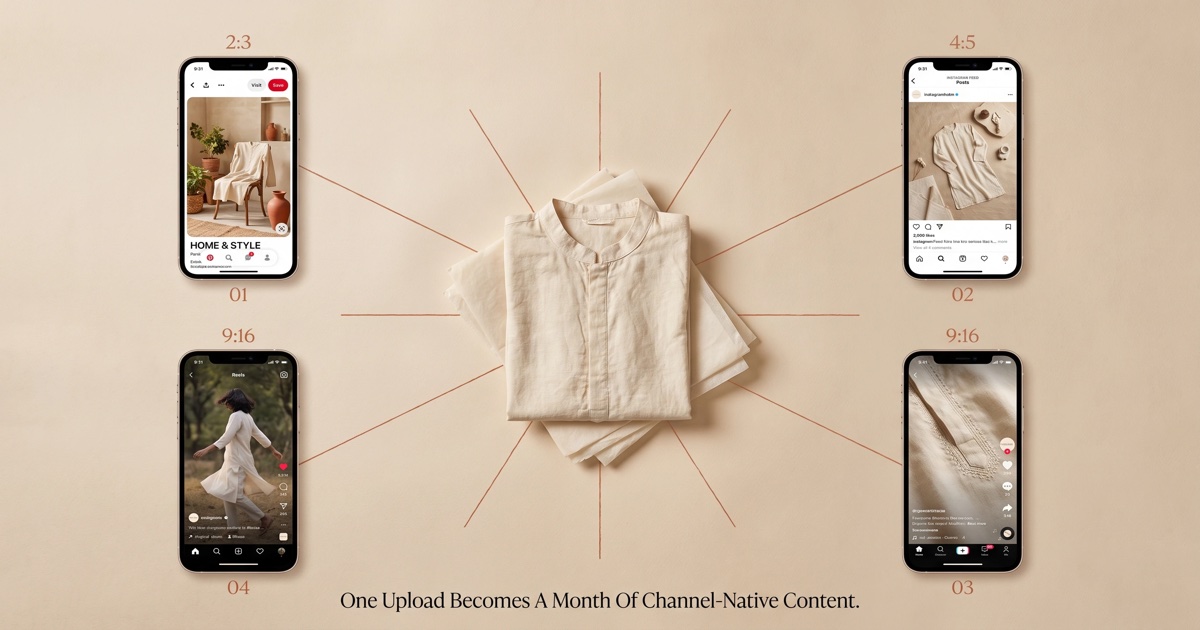
The biggest tax on fashion brand social isn't creative — it's adaptation. The shoot was made for the PDP. The lifestyle photographer didn't shoot vertical. The agency designer spends Mondays cropping last month's hero into 12 deliverables for IG, TikTok, and Pinterest. None of the result is channel-native; all of it underperforms.
This post is how to bypass that adaptation layer entirely — generate channel-native posts from a single garment upload, and ship a month of social on Monday morning.
Why "channel-native" matters more than ever
Channel-native means the image was composed for the channel's native aspect ratio, attention model, and feed grammar — not cropped down from another format.
| Channel | Native ratio | Attention model | What native looks like |
|---|---|---|---|
| Instagram feed | 4:5 vertical | 1-second scroll-pause | Garment-dominant, single subject |
| Instagram Reels | 9:16 vertical | 0.8-second hook | Motion-forward, model in mid-gesture |
| Instagram Stories | 9:16 vertical | 0.5-second tap-through | Bold copy overlay, single CTA |
| TikTok | 9:16 vertical | 0.6-second hook | Texture-forward, behind-scenes feel |
| 2:3 vertical | Search-driven, no time pressure | Lifestyle context, idea-board feel |
A single 4:5 PDP image cropped to all five does none of them well. Instagram feed gets too much white space. TikTok gets a "studio-y" composition that screams ad. Pinterest gets no context and never shows up in search.
Channel-native generation builds each asset from the same garment input, with a composition recipe matched to the channel. The garment is constant. The composition, lighting feel, and motion language are channel-specific.
The 1-upload-to-44-posts workflow
A single garment flat-lay (see Product Photoshoot) becomes:
| Channel | Native assets per month | Composition style |
|---|---|---|
| Instagram feed (4:5) | 12 posts | Garment-dominant, varied scenes |
| Instagram Reels (9:16) | 8 posts | Motion + close-up texture cuts |
| Instagram Stories (9:16) | 6 posts | CTA-forward, offer overlay |
| TikTok (9:16) | 8 posts | Hook-first, transition-driven |
| Pinterest (2:3) | 10 posts | Search-keywords + lifestyle context |
That's 44 channel-native posts from one garment upload. At SocialShot's per-image rates, the cost lands around ₹600–1,500 for a month of three-channel coverage — less than a single Canva designer's day rate.
The workflow:
- Upload the garment flat-lay + select a locked brand model (see Brand Models).
- Pick the month's content themes (we ship a 6-theme template: "weekday styling", "weekend lifestyle", "detail / closeup", "behind-the-fabric", "customer testimonial layout", "offer / launch").
- Generate the 44 assets in one batch. The pipeline returns each at the channel's native ratio.
- Add caption + hook copy layer (this is the part AI helps with less — see below).
- Schedule into your social tool of choice.
Total active time: 90 minutes. Most of which is writing captions.
Why the caption layer is still human-led
Image generation scales. Captions don't, not yet.
The reason: a high-performing fashion social caption is doing four things at once — hooking attention, naming the product, telling a micro-story, and prompting a comment-engagement trigger. AI-generated captions are getting better fast, but the brand voice is still the variable that needs the founder's ear.
Our recommendation: use AI to draft the caption (it'll get 60% of the way), then have one person on the team do a five-minute editorial pass before scheduling. That's still 80% faster than writing from scratch.
A one-month posting schedule template
Below: a real schedule shape we see working across our cohort. Numbers are posts per channel per week.
| Week of the month | IG feed | IG Reels | IG Stories | TikTok | |
|---|---|---|---|---|---|
| Week 1 (drop / launch focus) | 4 | 3 | 2 | 3 | 3 |
| Week 2 (lifestyle / context) | 3 | 2 | 2 | 2 | 3 |
| Week 3 (detail / fabric / quality) | 3 | 2 | 1 | 2 | 2 |
| Week 4 (UGC + reshare + offer) | 2 | 1 | 1 | 1 | 2 |
| Total per month | 12 | 8 | 6 | 8 | 10 |
This shape works because it front-loads the launch energy in week 1, hands the middle two weeks to lifestyle and quality storytelling (which is where consideration and saves happen), and lets week 4 ride on real customer content + a closing offer.
Where this approach should stop
Three things you should not try to outsource to one-upload-to-many generation:
- Real customer UGC. A genuine customer wearing your hoodie on a Sunday is content gold. AI cannot fabricate that trust signal — and faking it is a brand risk.
- Founder voice content. Direct-to-camera Reels from the founder explaining the fabric source, the manufacturing partner, the brand story. This is a human asset and should stay one.
- News-cycle / cultural moments. Real-time relevance (a cricket match, a film release, a festival) needs a human hand for both visual cue and caption tone.
The 44-post monthly volume is for evergreen catalog content. The 5–8 cultural / UGC / founder posts per month layer on top.
Get started
Upload one garment, pick your brand model, and run the 44-asset generation. Schedule them into your tool of choice. Most brands ship the first full month within 90 minutes. See Social Media Campaigns for the pipeline and pricing for the per-post math.
FAQ
Do these posts get flagged as low-effort by Instagram or TikTok?
No, as of mid-2026. Both platforms' algorithms reward novel imagery per post and consistent posting cadence. Channel-native AI generation gives them both. The historic "low effort" tag was applied to recycled content, not to fresh assets generated from a real product.
What about Reels' preference for "real" / unpolished content?
Real cuts. Use AI for the production B-roll (close-ups, motion-forward establishing shots) and intercut with one or two real founder/UGC clips per Reel. Hybrid Reels outperform pure-AI or pure-real content in the same cohort.
How do I keep the brand voice consistent in captions across 44 posts?
Build a one-page brand voice document (3 do's, 3 don'ts, 5 example captions). Feed it as a system prompt into your caption generator. Edit each draft for 60 seconds before scheduling.
Will Pinterest's algorithm rank AI-generated images?
Yes, the same as any other. Pinterest ranks on save-rate and click-through, not source. The win on Pinterest is using their search-keywords format in the title + description; the image just needs to be lifestyle-context (not white-background catalog).
What about hashtags and SEO captions?
Use AI to generate the first draft of channel-specific tags (Instagram, TikTok, Pinterest each have different rules) and edit. Auto-generated hashtag lists work well as a starting point, badly as a final shipped artifact.
Last updated: 28 June 2026. The 44-asset template is the current default and may be tuned per cohort as channel algorithms shift.